The Android OS
that lives
inside Android.
Bluebird is a free, open-source Android OS simulator and launcher. Run a full Android environment inside your phone — with a real desktop mode, built-in apps, and multitasking that feels native.
A real desktop.
On your phone.
Bluebird v1.7 running on Android — Windows 11 desktop, snap layouts, floating windows, weather widget, and a full built-in app suite.
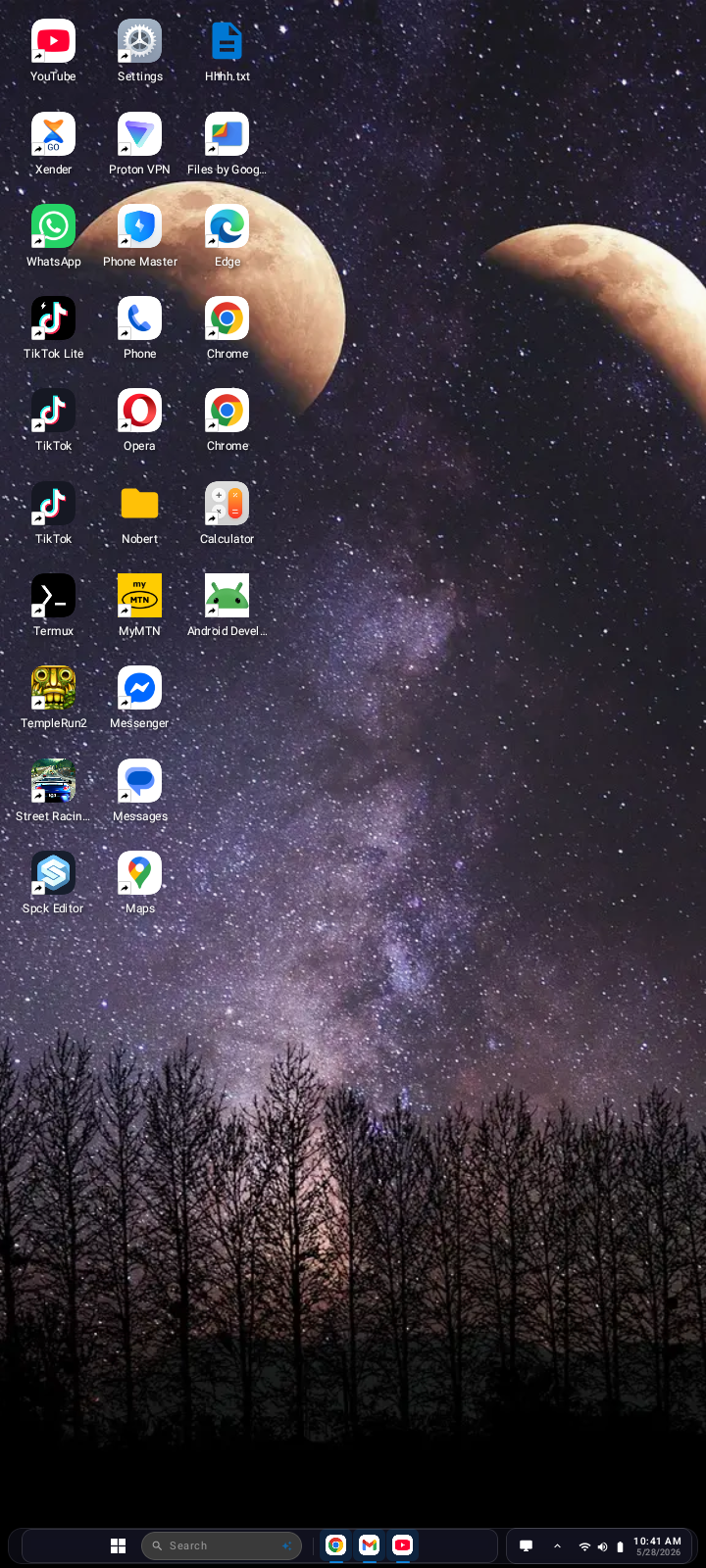
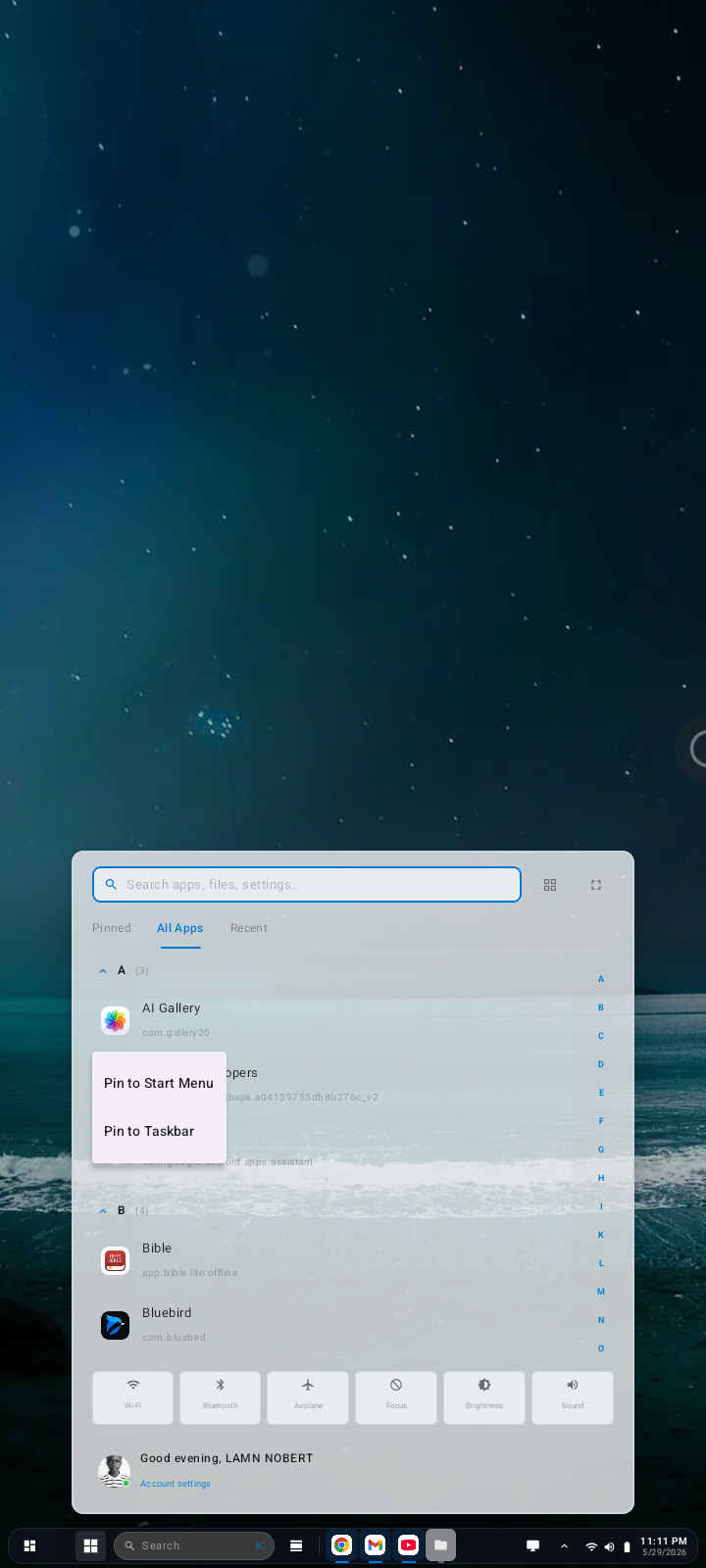
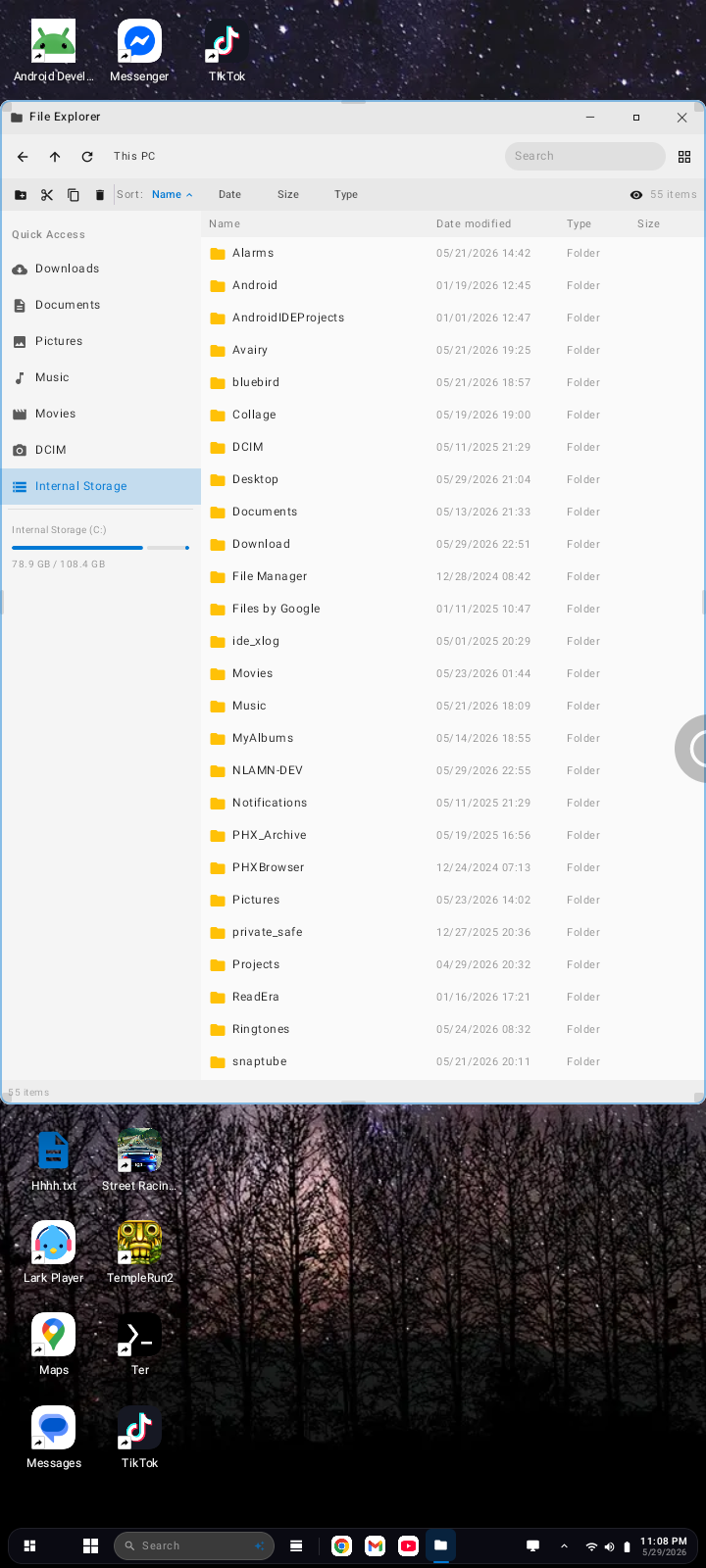
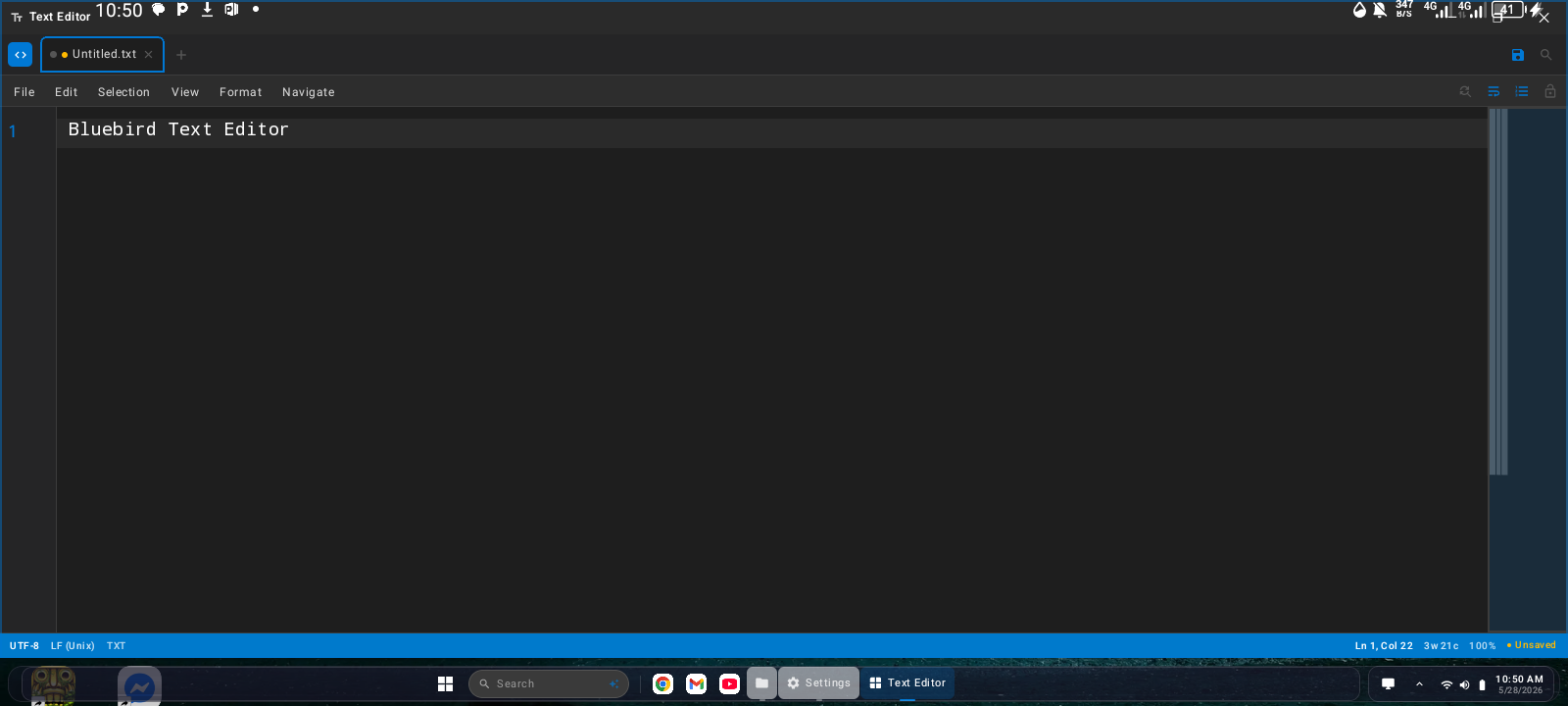
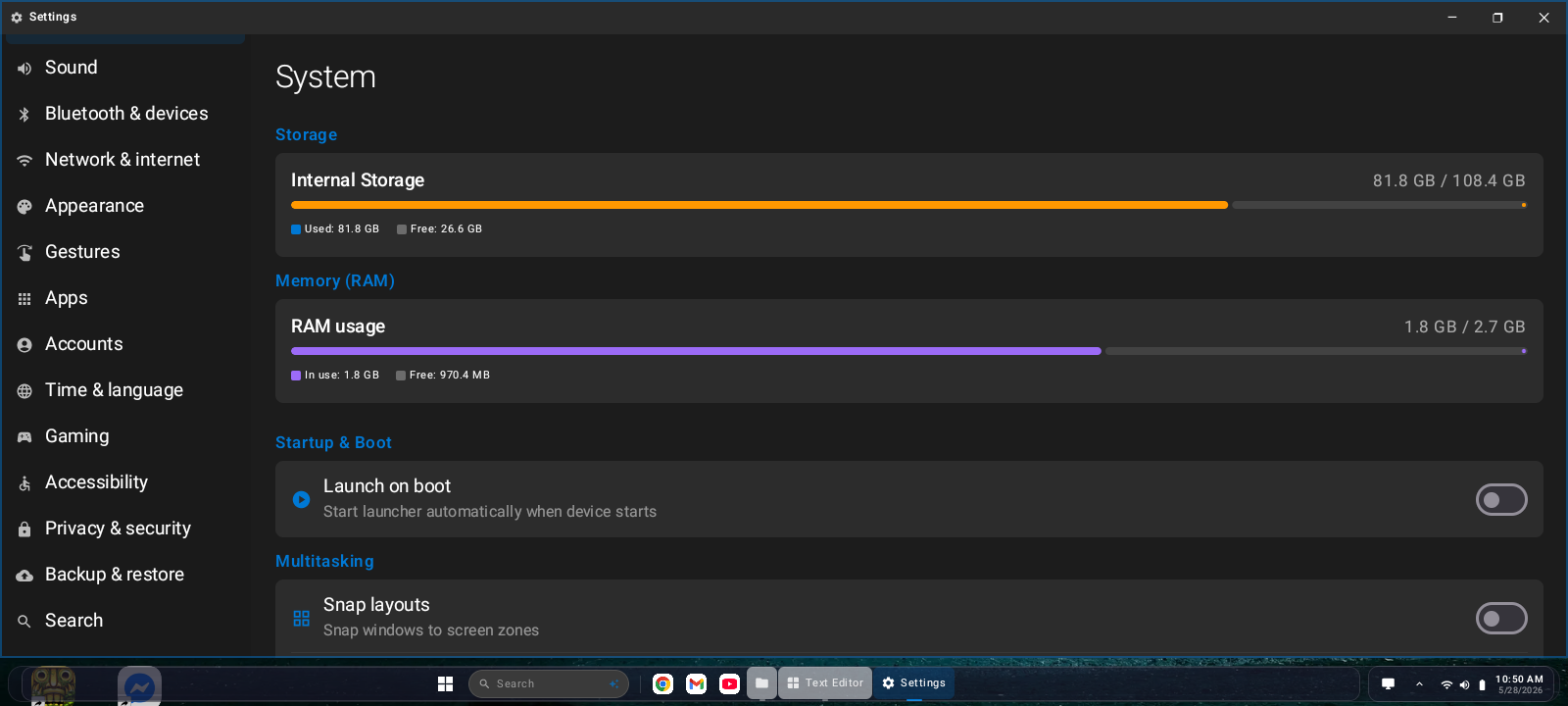
Bluebird v1.7 screenshots · tap to enlarge · Taken on Techno Pop 9
An entire Android
experience, layered on top.
Bluebird isn't just a launcher. It simulates an independent Android OS environment — complete with windowed apps, a taskbar, file manager, and full desktop mode that transforms any phone into a PC.
Desktop Mode
Plug in your phone to a monitor or just use it in hand — Bluebird's desktop mode gives you a real windowed experience with a taskbar, window controls, and proper multitasking.
Core FeatureOS Simulator + Launcher
Act as your home launcher or boot as a full simulator. Bluebird intercepts and manages your Android environment — giving you a completely different feel without rooting.
No Root NeededBuilt-in App Suite
Comes pre-loaded with essential tools: file manager, browser, settings, app store, terminal, calculator, and more — all designed to feel native inside the Bluebird environment.
Growing EcosystemLightweight & Fast
Bluebird is engineered to be low-overhead. We avoid bloat intentionally so it runs smoothly even on older or budget Android devices common across East Africa and beyond.
Fully Open Source
Every line of Bluebird is public. Inspect the code, contribute fixes, build your own fork, or ship your app through our ecosystem. MIT license. No tracking, no ads, no telemetry.
MIT LicensedBorn in Uganda
Built by Norbert (also known online as LAMN-NOBERT), based in Uganda, with a global vision. Bluebird is proof that world-class software is being made right here in East Africa.
East African TechRoadmap
v1.7 is now live. v1.8 is under active development, and v1.9 is in planning.
Major bug fixes across desktop, windows, and system apps — plus new functionalities and stability improvements.
Desktop icon fixes, taskbar icon overlap fixes, cleaner UI, weather API widget panel, improved landscape mode and overall stability. Download v1.7 →
In planning — continued improvements and new features building on v1.8's terminal and web app foundations.
Resizable floating windows, widget support, taskbar auto-hide, multiple virtual desktops, and more.
Every version, documented.
Bluebird follows a simple, predictable versioning scheme. Stable releases are tested thoroughly before ship.
| Version | Release Date | Status | Android API | Action |
|---|---|---|---|---|
| v1.9 | Planned | Planned | 26+ | |
| v1.8 | In Development | Under Development | 26+ | |
| v1.7 Latest | 2026 | Stable | 26+ | |
| v1.6 | 2026 | Stable | 26+ | |
| v1.5 | 2026 | Stable | 26+ | |
| v1.4 | 2026 | Stable | 26+ | |
| v1.3 | 2026 | Stable | 26+ | |
| v1.2 | 2026 | Stable | 26+ | |
| v1.1 | 2026 | Stable | 26+ | |
| v1.0 | 2026 | First Release | 26+ |
What changed in each version
- Desktop & Taskbar: Fixed desktop icons going off-screen in landscape mode; fixed taskbar icon overlapping when many icons are added
- UI: Removed text labels on built-in app taskbar icons for a cleaner, more minimal look
- Widget Panel: Polished design, new features, and working weather API integration
- Stability: Improved overall system stability, desktop responsiveness, and multitasking layout handling
- Major bug fixes across desktop, windows, and system apps
- New functionalities and expanded built-in app capabilities
- Performance improvements and stability gains
- Refined UI details and interaction feedback
- Advanced window management system with smoother interactions
- Snap layout picker — Windows 11–style layout overlay
- Scrollable desktop when screen fills with icons
- Replaced macOS-style traffic light controls with a more native look
- Default wallpaper now shown automatically on first launch
- Fixed app update system HTTPS 404 errors
- Fixed invisible desktop dead zones blocking icon drag
- Fixed icon overlapping when many icons added to desktop
- Improved drag-and-drop experience and icon placement
- Better update checking reliability via GitHub
- Complete in-app update system — checks and downloads updates from GitHub
- Post notifications for update availability, download progress, and completion
- Start menu polished for a more professional appearance
- Expanded settings and app management options
- Improved background task handling and overall stability
- Brand-new Start Menu with a modern, cleaner design
- Syntax and code highlighting added to the text editor
- Enhanced text editing capabilities and editor responsiveness
- Smoother transitions and overall UI consistency improvements
- Added multiple wallpaper modes — default, 5 built-in, and automatic cycling
- Fixed app icons going off-screen on some devices
- Improved app stability and responsiveness across Android devices
- Minor UI rendering fixes and visual consistency improvements
- Initial public release — full Windows 11–style desktop launcher
- Floating windowed app system, taskbar, Start Menu, and Action Center
- Real file explorer, phone dialer, SMS, media player, image viewer, Recycle Bin
- First-launch OOBE wizard with permissions, username, and avatar setup
- Open-sourced on GitHub under MIT license — API 26+ (Android 8.0+)
Apps from our team
and community.
Download and share apps built by Norbert (LAMN-NOBERT) and verified community developers. All apps are reviewed before listing.
Standalone apps built by Norbert — installable as Bluebird Web Apps .bwa or usable independently.
Interactive mathematics lab — graphing, algebra, geometry, calculus tools, and step-by-step problem solving. Built for students and educators.
Education platform built on Uganda's national curriculum. Lessons, exercises, and assessments for primary and secondary students — fully offline capable.
Text editor with a twist — the Repeat feature lets you repeat any text block up to 200,000 times. Great for generating test data, patterns, or just having fun with repetition.
Simulates real-world school lab experiments, physical phenomena, and scientific environments. Built as an extension of Remote Schools — bringing practical science to any device without a lab.
Everything you need
to use & build Bluebird.
From installation to building your own apps inside the Bluebird ecosystem — the docs have you covered.
Getting Started
Install Bluebird on your Android device, set it as your launcher, and take your first steps inside the OS environment.
Desktop Mode Guide
Enable and configure desktop mode. Works with external displays or in-hand. Learn window management, taskbar, and keyboard shortcuts.
Using Bluebird as a Launcher
Set Bluebird as your default Android launcher. Customize your home screen, app grid, gestures, and themes.
Built-in Apps Reference
Full guide to every app included in Bluebird — browser, file manager, terminal, notes, music player, and settings.
Building Apps for Bluebird
How to build Android apps that integrate with Bluebird's windowed mode and ecosystem APIs. With code examples.
Contributing to Bluebird
How to set up the dev environment, run tests, submit pull requests, and get your code merged into Bluebird core.
Upgrade Guides
Step-by-step instructions for upgrading from v1.0 → v1.1 → v1.2 → v1.3 → v1.4 → v1.5 → v1.6 → v1.7. Breaking changes are clearly flagged.
FAQ & Troubleshooting
Common questions, error messages, and fixes gathered from the community. Updated with every release.
Changelog Archive
Complete history of every release, every feature, every fix — from v1.0 to today.
github.com/Norbert-web/BLUEBIRD-PLUS/wiki for detailed guides with screenshots and video walkthroughs. (Docs expansion in progress — contributions welcome!)Quick Start
# Step 1: Download Bluebird APK from the downloads page
# Step 2: Install via ADB or manually from your file manager

adb install bluebird-v1.7.apk

# Step 3: Set Bluebird as your default launcher
# Go to Settings → Apps → Default Apps → Home App → Bluebird

# Step 4: For Desktop Mode, connect to a monitor via USB-C/HDMI
# Or enable it from Bluebird Settings → Display → Desktop Mode

# Step 5: Explore the built-in app suite and customize your environmentJoin the Bluebird community.
Bluebird is built in public, with the community. Find us on these platforms, share feedback, report bugs, and help shape the future of the project.
Get Bluebird on your device.
All builds are free. Always will be. Choose the version that's right for you.
The latest stable release. Recommended for all users. Desktop icon & taskbar fixes, cleaner UI with no text labels, polished widget panel with working weather API, improved landscape mode, and all features as of v1.7.
v1.8 is under active development (terminal & web app installation coming), and v1.9 is in the planning stage.
Previous stable releases. Useful for testing compatibility on specific device configurations or Android versions.
Lightweight browser for the Bluebird environment.
Full-featured file manager with windowed mode support.
Shell terminal with SSH support, built for Bluebird.
sha256sum bluebird-v1.7-arm64.apkBuilt in Uganda.
Built for the world.
The story of Bluebird — who we are, why we built it, and where we're going next.
Bluebird started with a simple question: what would Android look like if it felt like a real desktop OS? Not just a phone launcher, but a full environment — windows, taskbars, multitasking, built-in apps — all running on the phone in your pocket.
Norbert is the creator behind Bluebird OS, based in Uganda. We started Bluebird because he believed world-class software doesn't have to come from Silicon Valley — it can come from Kampala.
Bluebird is completely free and open source under the MIT license. We have no investors, no VC funding, no subscription fees. We build it because we love Android and we believe in the open-source philosophy.
Made in Uganda
Bluebird is proudly developed in Uganda. We're part of the growing East African tech movement, showing that impactful, polished software is being built right here.

Norbert is a self-taught Android developer from Kampala, Uganda. He started Bluebird with one question in mind: what would Android look like if it genuinely felt like a desktop OS?
Every line of Bluebird — the OS simulator core, the desktop mode, the windowing system, the built-in app suite, and the website — is built and maintained by Norbert alone. Bluebird has no VC funding, no investors, and no team. Just one developer, open source, and a community of users who believe in it.
Beyond Bluebird, Norbert also builds Remote Schools (an offline education platform on Uganda's curriculum), EchoChamber, Math Labs, and the Virtual Physical Environment Simulator — all free, all open source.
Our Mission
To make Android feel like the powerful OS it can be — with a real desktop experience, modular apps, and an ecosystem that anyone can contribute to.
Open Source First
Every line of Bluebird is public. We maintain GitHub repos, respond to issues, and review PRs. Open source isn't a marketing strategy — it's how we build.
Built for Everyone
Bluebird is designed to run on budget devices, not just flagships. Accessible software for the global majority — especially in regions where hardware is limited.
Privacy Policy
We believe privacy is a right. Here's what Bluebird collects — and what it doesn't.
The Short Version
Bluebird OS collects no personal data, no telemetry, no analytics. The app runs fully offline by default. We don't have servers watching your usage. We don't know who you are. We don't want to.
- Nothing automatically. Bluebird does not phone home, does not send crash reports automatically, and does not collect usage statistics.
- GitHub interactions. If you open an issue or PR on GitHub, GitHub's own privacy policy applies to that interaction.
- Community platforms. If you join our Telegram, Discord, or Reddit — those platforms' own policies apply.
- All your files, settings, and app data within Bluebird stay on your device only.
- Bluebird does not sync or back up your data to any external servers we operate.
- You are in full control.
Terms of Use
Simple, plain-language terms for using Bluebird.
- You may use Bluebird freely for personal, educational, or commercial purposes.
- You may modify the source code under the terms of the MIT license.
- You may distribute copies or modified versions with attribution.
- Do not redistribute Bluebird while claiming it is your own original work without attribution.
- Do not use Bluebird to violate laws in your jurisdiction.
- Do not remove license notices from distributed copies.
- Bluebird is provided "as is" without warranty of any kind.
- Norbert (LAMN-NOBERT) is not liable for any damages resulting from use of Bluebird.
- Use at your own risk — though we work hard to make every release solid.
MIT License
Bluebird OS is free and open source software, distributed under the MIT License.
MIT License

Copyright (c) 2024–2026 Norbert (LAMN-NOBERT), Uganda

Permission is hereby granted, free of charge, to any person obtaining
a copy of this software and associated documentation files (the "Software"),
to deal in the Software without restriction, including without limitation
the rights to use, copy, modify, merge, publish, distribute, sublicense,
and/or sell copies of the Software, and to permit persons to whom the
Software is furnished to do so, subject to the following conditions:

The above copyright notice and this permission notice shall be included
in all copies or substantial portions of the Software.

THE SOFTWARE IS PROVIDED "AS IS", WITHOUT WARRANTY OF ANY KIND, EXPRESS
OR IMPLIED, INCLUDING BUT NOT LIMITED TO THE WARRANTIES OF MERCHANTABILITY,
FITNESS FOR A PARTICULAR PURPOSE AND NONINFRINGEMENT. IN NO EVENT SHALL
THE AUTHORS OR COPYRIGHT HOLDERS BE LIABLE FOR ANY CLAIM, DAMAGES OR OTHER
LIABILITY, WHETHER IN AN ACTION OF CONTRACT, TORT OR OTHERWISE, ARISING
FROM, OUT OF OR IN CONNECTION WITH THE SOFTWARE OR THE USE OR OTHER
DEALINGS IN THE SOFTWARE.